A chore calendar that shows what is due
Choru opens on a week calendar with the selected day's chores listed under it. Pull the week down to see the whole month, tap a day, and see what was due, what is due and what slipped.
 Choru is an iPhone appPoint your iPhone camera at the code to install it.
or text me the link
What the chore calendar does
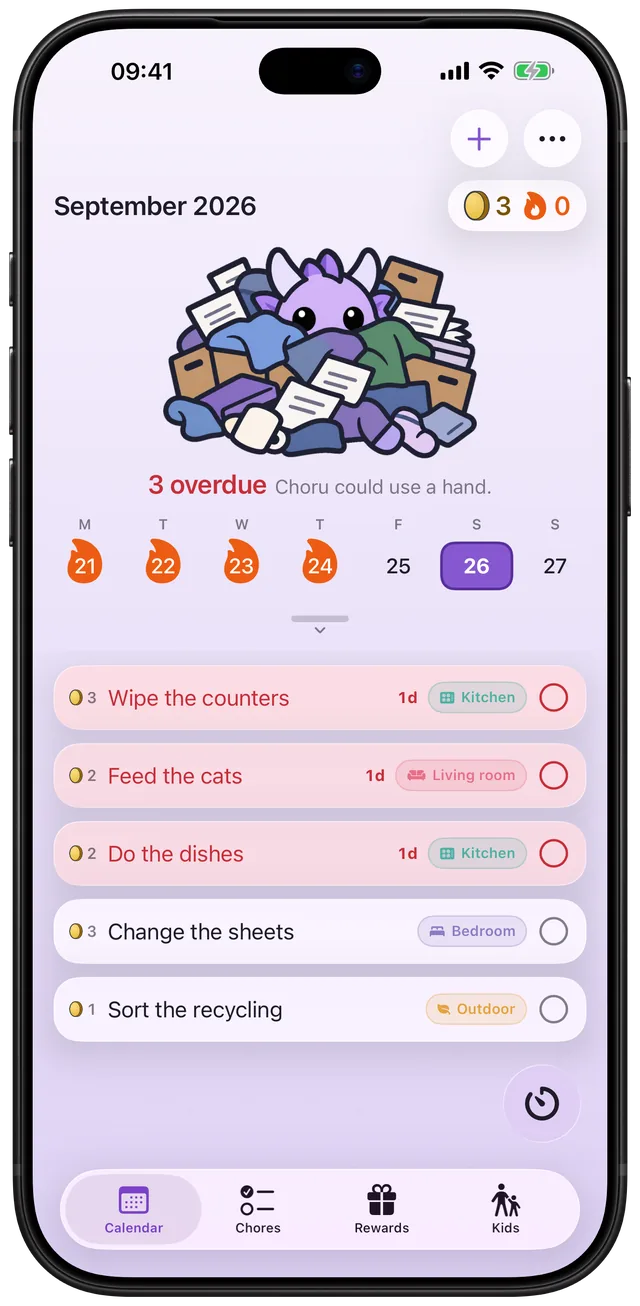
The Calendar tab is the first screen in Choru. A strip of seven days sits at the top, today is highlighted, and the chores due on the selected day are listed below it. Drag the strip down, or tap the small handle under it, and it grows into the full month. Tap any day to see what was due on it or what is coming.
The Clock app can repeat an alarm on chosen days, and that is a fair way to get a nudge at a set hour. It has no list of chores, no tick, and no way to look at last Tuesday or next Friday and see which jobs belong there. A chore is not a moment in time, it is a job that is due on a day and stays due until it is done. The calendar is built around that: it shows the day, the jobs, and which ones are still open.
How it works, step by step
- Open Choru. The Calendar tab is the default, with today selected and its chores listed under the week strip.
- Tap another day in the strip, or swipe sideways to move one week at a time. The list slides to that day.
- Drag the strip down, or tap the handle under it, to open the month. Swipe sideways to move by month. Drag up or tap the handle again to fold it back to a week. Choru remembers which shape you left it in.
- Tap the check circle on a row to tick that chore. Tap a row itself to edit it.
- Tap Today, top left, to jump back. It only appears when you are looking at another day.
- Tap the + (Add chore) button. The new chore starts on the day you are looking at, not always today.
The weeks start on whatever day your iPhone's region says the week starts on. Chores repeat on their own schedule, so the calendar fills itself in once you have set them up. Each chore has its own repeat setting, so you set the schedule once in the chore editor.
What each day tells you
A day in the grid is a number, plus a mark when something happened on it:
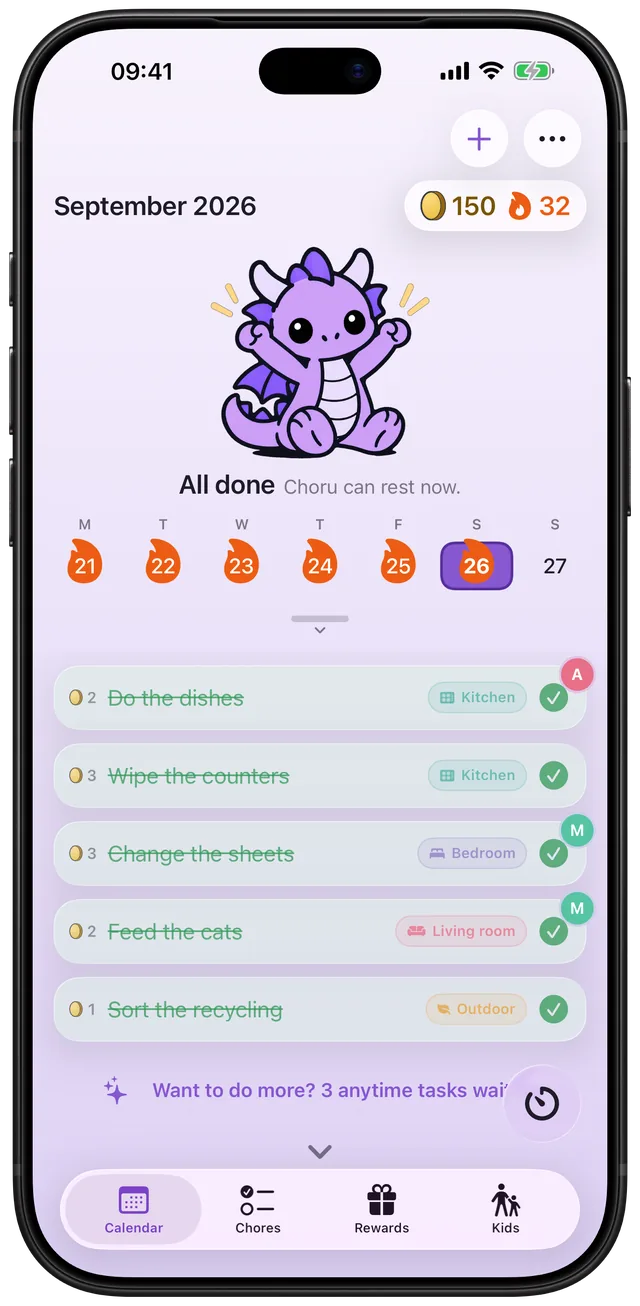
- A flame means the day had chores and all of them got done.
- A snowflake means a streak freeze was spent to cover a missed day.
- A small mark means nothing was due and the day carried a streak across.
- A hand-drawn X means chores were due on a past day and not all were done.
Above the strip, Choru the dragon gives the status line, such as "3 overdue" or "All done". Tap the coins and flame counter in the corner to open your stats. Rest days and away days keep the streak safe, as described below.
What you can do from a day
| Where | What it does | Notes |
|---|---|---|
| Today | Shows today's chores, plus carried-over ones in red | A chore that was missed shows once, with how late it is. Press and hold its circle and choose Done yesterday |
| A past day | Shows what was due that day and what was still open then | Late rows show how late they were on that day |
| A future day | Shows only what is scheduled for it | You can tick only a chore's next occurrence, not later ones |
| Swipe a row right | Tomorrow moves it one day | A chore can be moved once until you do it |
| Swipe a row left | Delete | Hidden on a kid's phone |
| The "..." menu | Hide completed or Show completed | Hides ticked chores from the day's list |
| Timer button | Start a timed tidy | Bottom right of the screen |
A future day never shows carried-over rows, so looking ahead never loads today's backlog onto next week. A past day shows the late rows as they stood on that day. A chore missed several times is one row. Ticking it takes the row off your list; the days you missed still count as missed.
On rest days, and while you are away, chores show as skipped and nothing is expected of you, so the streak is kept. While a pause is running, a banner on today says when chores come back.
When the calendar is the right tool
Planning the week on Sunday night
Swipe through the week and see which days are heavy. If Thursday has the bins, the sheets and the shop, use Tomorrow on one of them, or look at the month and spread the rest.
Checking what you missed last week
Tap a past day and the list shows what was due on it. The X marks tell you which days slipped without opening each one.
Seeing when the big jobs fall
Monthly and every few months jobs, like the oven or the fridge, are easy to lose. Open the month and tap ahead to see which days carry them. Jobs with no fixed date do not need a day on the calendar, so keep them as anytime tasks.
Sharing the house
In a family, each person sees their own chores on their own phone, and the Calendar shows who ticked what. Setting that up is covered in how to share a chore list with your family on iPhone.
Adding a chore for a specific day
Open the day first, then tap +. The editor starts on that date, which saves a step when you are planning ahead.
What it does not do
- It is not a printable chart. Choru has no print or PDF export, so a fridge chart has to be a screenshot.
- It does not sync with the Calendar app. Your chores stay inside Choru and do not appear in your other calendars.
- Ticking ahead is blocked. You cannot tick tomorrow's daily chore today, only the next occurrence of each chore.
- The Done yesterday shortcut on a late chore reaches back one day only.
- There is no free version. Choru starts with a 7-day trial on the yearly plan, or you can buy it once as a lifetime unlock.
- It is for iPhone, and needs iOS 26.5 or later.
If you want the broader picture of dividing a household's jobs, read how to manage household chores.
Frequently asked questions
Is there a chore calendar app for iPhone?
Yes. Choru's Calendar tab is a week strip with the selected day's chores under it. Pull it down to see the month, and tap any day to see what was due or is coming.
Is this chore calendar app free?
Choru has no free version. It starts with a 7-day trial on the yearly plan, and you can also buy a lifetime unlock once. Check the App Store listing for current prices.
Can a family chore calendar show everyone's chores?
Each person sees their own chores on their own phone once they join the family. Up to five people can share a household, and each chore can be assigned to one person or several.
Can I print the chore calendar or put it in the Calendar app?
No. Choru has no print, PDF or calendar sync. The chores live inside the app, so for a fridge chart you would take a screenshot.
What happens to a chore I did not do?
On today it appears in red as one row with how many days late it is. Ticking it takes it off the list, and the days you missed stay marked as missed.
Can I look at a past day or a future day?
Yes. A past day shows what was due on it, and a future day shows what is scheduled. Ahead of today you can tick only a chore's next occurrence, so tomorrow's daily chores stay untouched.
Sources
See what is due this week
Get Choru on the App StoreMore features

Anytime tasks that come back later
Jobs with no fixed date come back 1, 3, 6 or 12 months after you tick them off.
Repeats that fit real chores
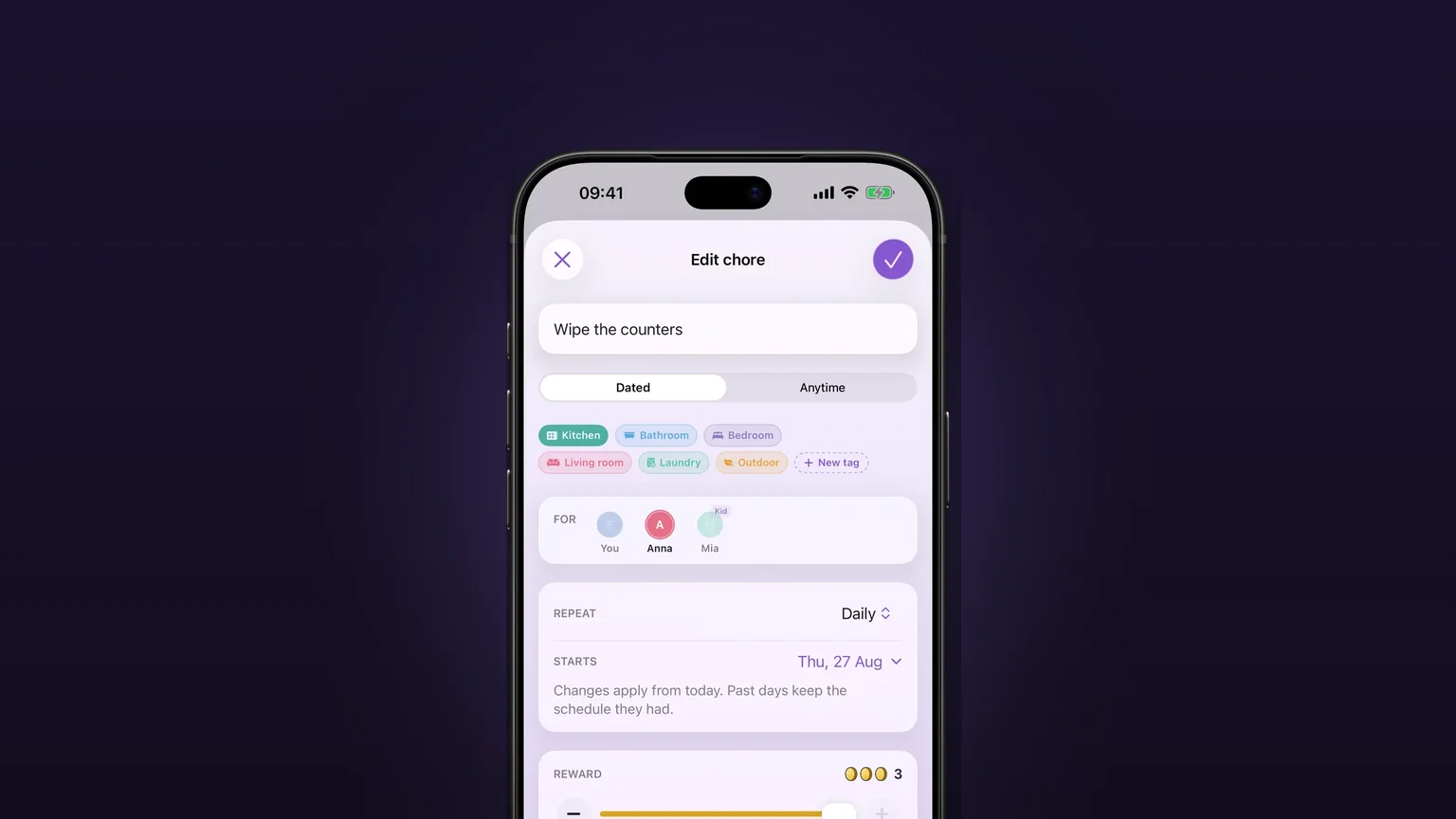
Daily, on set weekdays, weekly, monthly, quarterly, or every few days, weeks, months or years, with past days left alone when you change a schedule.

Coins and rewards you pick
Every chore pays 1 to 3 coins, and you write the rewards, set their prices and spend the coins.